This content is for informational purposes only and does not substitute professional medical advice. Always consult a physician for diagnosis and treatment.
Telemedicine lets you see a health care provider by video or phone, from home, for many everyday health problems. In 2026, a video visit can handle things like a cold, a rash, a refill question, or a check-in on a stable condition. What it cannot do is replace a hands-on exam when one is truly needed.
For people around Westlake Village and Ventura County, a virtual visit can save a trip and get you care faster. The trick is knowing which problems fit a screen and which still need a room.
Telehealth has become a regular part of care since the pandemic, not just a backup. Used well, it fits neatly around a busy life while keeping your own doctor in the loop.
Here is a plain guide to what a video visit covers in 2026, where its limits are, and how to make your appointment go smoothly.
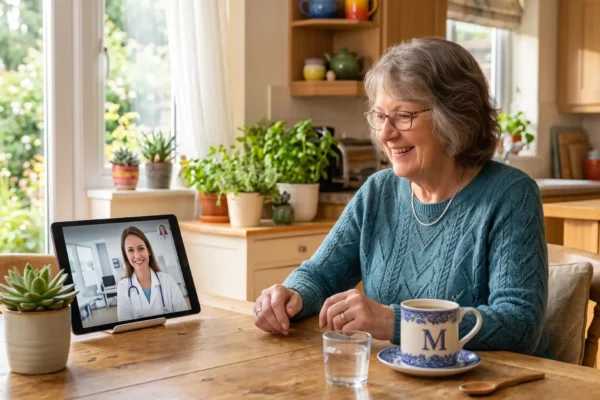
What Is Telemedicine, and How Does a Video Visit Work?
As Mayo Clinic explains, telemedicine is one part of a wider set of digital health tools that also includes patient portals and remote monitoring. The video visit is the piece most people picture when they hear the word.
Before the visit, your care team may send forms to fill out and check that your app or link is ready. During the visit, the provider asks about your symptoms and history, looks at anything you can show on camera, and makes a plan. If a prescription is needed, they send it to your pharmacy.
You may also hear the word telehealth used alongside telemedicine. Telehealth is the bigger umbrella, covering everything from video visits to secure messaging and health tracking. A video appointment with a provider is the telemedicine part of that picture.
How Has Telehealth Changed by 2026?
Two shifts stand out. First, video quality and easy apps have made visits smoother, so a check-in feels less like wrestling with technology. Second, remote monitoring has matured, so a provider can follow blood pressure or blood sugar readings from home between appointments.
The result is more flexibility. You can often choose a video visit, an in-person visit, or a mix, depending on what the problem needs. Rules about which visits are covered can still change, so it is worth asking your provider’s office what they offer before you book.
For families around Westlake Village, that flexibility can smooth out a busy week. A quick video check-in for a minor issue, paired with in-person care when it is truly needed, often covers most of what a household runs into.
What Can a Telemedicine Visit Treat?
Common reasons for a video visit include:
- Colds, coughs, and COVID-19 symptoms
- Skin problems and rashes you can show on camera
- Migraines and headaches
- Urinary symptoms and minor infections
- Follow-up on stable conditions like diabetes or blood pressure
- Mental and behavioral health, such as anxiety, depression, and sleep problems
- Medication questions and refills
Cleveland Clinic notes that providers can offer the same level of care by video for many nonemergency problems, and can use a virtual visit as a bridge into in-person care when that becomes necessary. For a lot of everyday needs, the screen is enough.
Mental and behavioral health is one of the strongest fits. Talking through anxiety, low mood, or sleep trouble does not need a physical exam, and many people find it easier to open up from a familiar room at home.
Chronic conditions do well by video too. A steady check-in on diabetes or blood pressure, a review of home readings, and a quick plan for the next few weeks can all happen without a drive. The visit keeps your care on track between any in-person appointments you still need.
What Can't a Video Visit Do?
Call 911 or go to the emergency room for chest pain, trouble breathing, signs of a stroke, or any sudden, severe symptom. A screen is the wrong tool when minutes matter, and even the best video call cannot start emergency treatment.
Some non-emergencies also need an in-person step. A provider may ask you to come in for a blood draw, a strep test, or a closer look at something they cannot fully assess on camera. When lab work is the missing piece, at-home lab testing in Westlake Village can sometimes bring that part to you.
There are practical limits too. A video visit needs a device and a decent internet connection, and it does not allow a physical exam, which can matter for a firm diagnosis.
A purely online, on-demand service has its own trade-offs. Care from a provider who has never met you may miss details from your history, and it may not coordinate with your regular doctor. When possible, a video visit with a provider who knows you tends to give a fuller picture.
What Do You Need for a Telehealth Appointment?
The benefits are real: you can be seen from home, work, or even your car, you skip travel and parking, and you often get an appointment sooner. For anyone who tires easily or has trouble getting out, that convenience matters.
If you are new to the technology, ask a family member to help you set it up the first time. Many providers’ offices will also walk you through the login by phone before your visit.
Access is not equal for everyone, and that is worth naming. People without home internet or a smartphone can be left out. A local library or community center with free wireless and a private room can be a practical workaround for a video visit.
How Do You Prepare for a Video Visit?
- Sign on 10 to 15 minutes early to sort out any tech issues
- Sit facing a light source, not with a window behind you
- Keep a list of your medicines, allergies, and main symptoms handy
- Have a flashlight nearby to show a rash or sore area
- Take notes, or ask for a summary of the visit afterward
- Have your pharmacy details ready in case a prescription is sent
It also helps to have a backup plan. If the connection drops, know that you can usually finish the visit by phone, so a shaky signal does not end your appointment.
Setting the scene matters more than people expect. Try to be somewhere quiet, without a running television, kitchen noise, or pets underfoot. If someone is helping you, have them stay nearby so they can assist, then step out once the visit begins to keep things private.
Position your device on a steady surface so the provider can see your face and upper body. Speaking in short sentences and pausing now and then helps too, since a small audio delay can otherwise cause you both to talk over each other.
Is Telehealth a Good Choice for Older Adults?
Remote monitoring adds another layer. Devices that track blood pressure, blood sugar, or heart rate can send readings to a provider between visits, which helps manage ongoing conditions from home.
There is a family benefit as well. An adult child can sit in on a video visit, help explain symptoms, and take notes, even from another city. That shared understanding often makes follow-up care easier for everyone involved.
Still, a video visit is not always the right call. When a problem needs a hands-on look, a doctor who visits you at home can be a gentler option than a clinic trip. And when an in-person appointment cannot be avoided, non-emergency wheelchair transportation can help a loved one get there safely and on time.
Frequently Asked Questions
What is telemedicine?
Telemedicine is a live appointment with a health care provider by video or phone instead of an in-person visit. You connect from home using a smartphone, tablet, or computer. It is one part of the wider set of telehealth tools.
What can a video visit treat?
Video visits work well for colds, coughs, rashes, migraines, urinary symptoms, medication questions, and follow-ups on stable conditions. They are also widely used for mental and behavioral health. Anything life-threatening needs in-person emergency care.
When do I need an in-person visit instead of telehealth?
You need in-person care for emergencies and for anything that requires a hands-on exam or a test like a blood draw or strep test. Call 911 for chest pain, trouble breathing, or signs of a stroke.
What do I need for a telehealth visit?
You need a smartphone, tablet, or computer with a camera and internet access. A quiet, private, well-lit spot helps, and it is fine to ask a family member to help you set up the technology the first time.
How do I prepare for a video visit?
Test your camera and microphone, sign on a few minutes early, and sit facing a light source. Keep a list of your medicines, allergies, and symptoms nearby, and have a flashlight handy to show a rash or sore area.
Is telehealth good for seniors?
Yes, telehealth can be a great fit for older adults, especially for follow-ups, medication reviews, and mental health support. Remote monitoring devices can also track things like blood pressure between visits. Some problems still need a hands-on exam.